.png)
.png)
.png)
The Complete Guide to Ultra-Realistic AI Twins
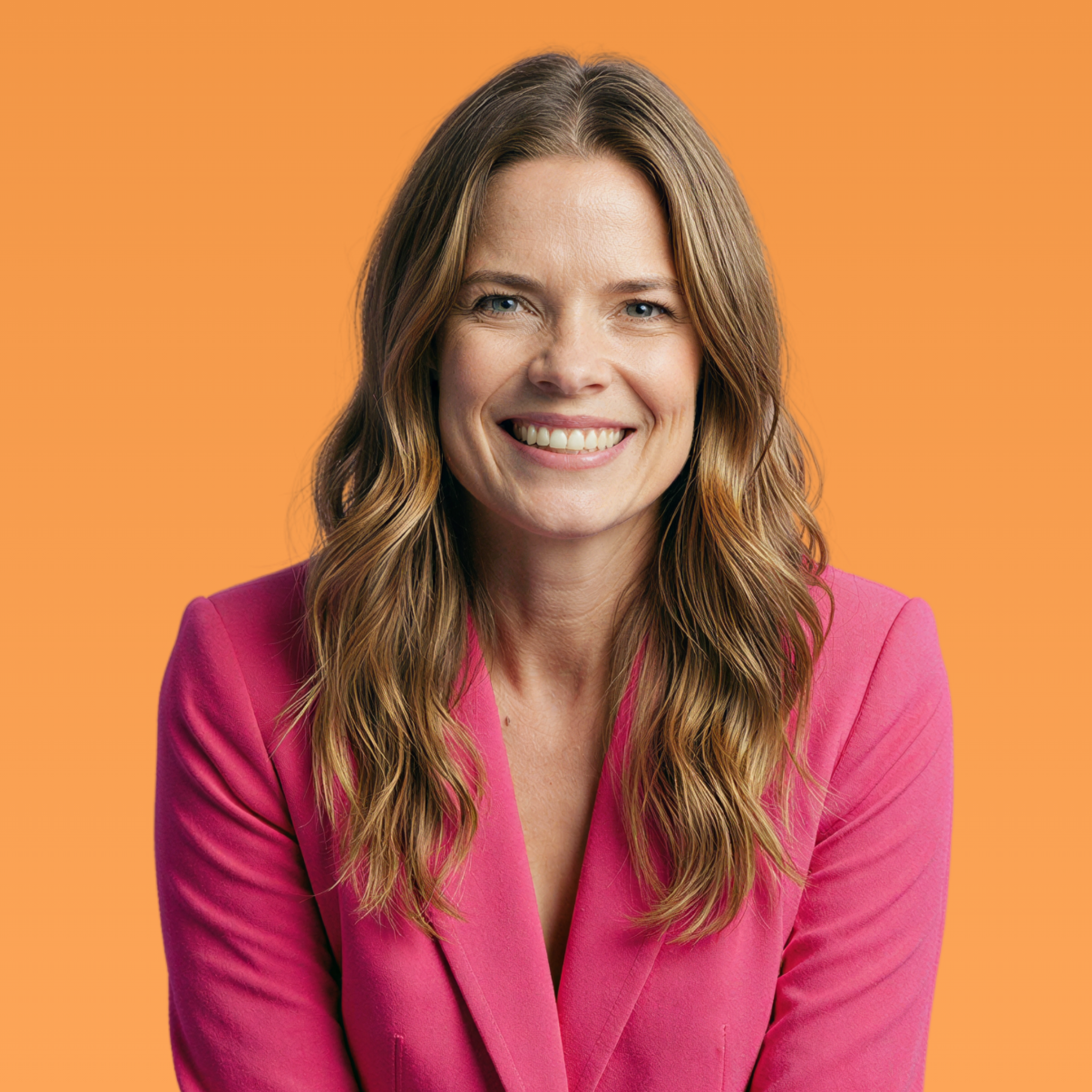

Let's be honest for a second.
You've probably seen AI-generated images that made you cringe. The ones with weirdly smooth skin, dead eyes, and that unmistakable "this is definitely fake" vibe. Maybe you've even tried creating your own AI twin and thought, "Why does mine look like a mannequin from a department store?"
You're not alone. And honestly? It's not your fault.
Most AI twin courses teach you how to make functional AI images—ones that technically look like you. But they skip the part that actually matters: making them look human.
That's exactly what this guide is about.
I'm going to walk you through everything I've learned about creating ultra-realistic AI twins—the kind that make people DM you asking what camera you use. The kind where your own mom can't tell the difference. The kind that actually builds trust instead of breaking it.
So What Is an Ultra-Realistic AI Twin?
An ultra-realistic AI twin is a digital replica of yourself (completely fictional character is an Avatar) that's so lifelike, people genuinely can't tell it's AI-generated.
But here's the key distinction most people miss:
"Realistic" AI is not the same as "ultra-realistic" AI.
Regular AI twins might fool someone scrolling quickly. They might even fool your husband at first glance. But ultra-realistic AI twins? They hold up to scrutiny. They pass what I call the screenshot test.
What Is the Screenshot Test?
The screenshot test is my quality standard for AI twins.
Here's how it works:
1. Take a screenshot of your AI image
2. Zoom in to 400%
3. Look for these specific details:
• Visible pores (not airbrushed smooth)
• Natural skin texture with slight imperfections
• Fine lines and natural shadows
• Realistic eye moisture and reflections
• Hair that doesn't look like it was painted on
If your AI twin still looks real at 400% zoom? That's ultra-realistic. If it falls apart and starts looking waxy or weird? You've got regular AI. And regular AI kills trust.
Why Does Ultra-Realism Actually Matter?
Here's the thing nobody tells you: your audience can tell when something's off—even if they can't articulate what.
Our brains are incredibly good at detecting fake humans. It's called the "uncanny valley" effect, and it makes us feel uneasy when something looks almost human but not quite.
That discomfort? It translates directly to distrust.
When your AI content looks fake—even slightly—people scroll past. They don't engage. They definitely don't buy.
But when your AI content is indistinguishable from a real photo? People stop. They trust. They connect.
Ultra-realistic AI builds the same trust as showing up yourself—without requiring you to actually show up yourself.
The Three Paths to Your AI Twin
Not everyone wants the same thing from their AI twin—and that's completely okay.
Some people want an exact digital clone. Others want privacy. Some want to stay completely faceless while still building a personal brand.
The Three-Path Framework gives you options based on your comfort level and goals—without sacrificing realism on any path.
Path 1: Exact Clone
Best for: Content creators who want to scale their personal brand without filming every day.
An exact clone is an AI twin that looks exactly like you—same features, same vibe, same "you." When people see your AI content, they genuinely think they're looking at a photo of you.
This path is perfect if you:
• Already have an established personal brand
• Want to create consistent content without being "on" 24/7
• Are comfortable with your face being online
• Want to batch a month of content in one afternoon
The key difference with ultra-realistic exact clones: They keep your natural features—including the "imperfections" that make you recognizable. Fine lines, skin texture, the specific shape of your smile. Regular AI smooths all that away. Ultra-realistic AI preserves it.
Path 2: Privacy-Protected Twin
Best for: People who want realism without being personally identifiable.
A privacy-protected twin looks completely human and realistic—but isn't traceable back to your actual face because it isn't an exact copy of your face. It's what I personally use.
Why? Because I have kids. And while I want to show up online and build my brand, I don't want strangers being able to reverse-image-search me and find my family.
This path is perfect if you:
• Want to maintain personal/family privacy
• Have safety concerns about being too visible online
• Want a "face" for your brand that isn't your exact face
• Prefer keeping your personal and professional lives separate
The magic of a privacy-protected twin: People assume they're looking at a real person because the AI twin passes every realism test. But if someone tried to trace that face back to you in real life? They couldn't.
Path 3: AI Avatar (Completely Fictional)
Best for: Faceless creators who still want a human presence.
An AI avatar is a completely fictional character that represents your brand—but still looks like a real human being.
Not a cartoon. Not an obvious AI character. A person who could walk into a coffee shop and no one would blink.
This path is perfect if you:
• Want to stay completely faceless
• Run multiple brands that need different "faces"
• Want to create a brand that can eventually be sold
• Prefer not to tie your personal identity to your business
The key to successful AI avatars: They need to be consistent and ultra-realistic. A fictional character that looks different in every post or has that "AI look" will tank your engagement faster than no face at all.
All three paths share one standard: ultra-realism. Your AI twin should pass the screenshot test regardless of which path you choose.
Why Do Most AI Images Look Fake?
Before we get into how to create ultra-realistic AI twins, let's talk about why most AI images fail in the first place.
Understanding the problem is half the solution.
The Plastic Skin Problem
Most AI tools default to what I call "magazine perfection." They smooth out every pore, erase every line, and create skin that looks like it's been airbrushed into oblivion.
The result? Skin that looks plastic. Shiny.
Fake.
Real human skin has texture. It has pores. It has those tiny imperfections that our brains subconsciously recognize as "human." When AI erases all of that, it triggers the uncanny valley response—and your audience scrolls past.
The Dead Eyes Problem
Eyes are incredibly hard for AI to get right. Real eyes have:
• Moisture and subtle reflections
• Tiny blood vessels in the whites
• Natural asymmetry between left and right
• Catch lights that match the environment
• Subtle variations in iris color
When AI generates perfect, symmetrical, uniformly-colored eyes with no moisture... they look dead. And dead eyes make people uncomfortable even if they can't explain why.
The Over-Processing Problem
Many AI workflows actually add to the problem by running images through additional filters and "enhancement" tools that smooth everything out even more.
The fix isn't about more processing. It's about strategic processing—adding the right details back in, not taking more out.
The RealTwin Method
Here's the counterintuitive truth about ultra-realistic AI twins:
Imperfection is what makes them believable.
I call this the RealTwin Method—the deliberate inclusion of natural human details that most AI tools erase.
What to Include
Ultra-realistic AI twins need these elements:
• Visible pores – Not huge or obvious, just naturally present
• Fine lines – Especially around eyes and mouth when smiling
• Skin texture variation – Slightly different textures on forehead vs. cheeks vs. nose
• Natural color variation – Slight redness in some areas, different undertones
• Realistic lighting – Proper shadows and highlights that match the scene
• Eye detail – Moisture, reflections, subtle bloodshot areas
• Hair detail – Individual strands, flyaways, natural movement
These aren't flaws. They're authenticity markers that signal "real human" to our brains.
What to Avoid
Equally important is knowing what NOT to do:
• Over-smoothing – Resist the urge to "clean up" skin texture
• Perfect symmetry – Real faces aren't perfectly symmetrical
• Uniform lighting – Real photos have natural light variation
• "Enhancement" filters – These usually make AI more detectable, not less
• Overly posed compositions – Natural photos have slight imperfection in framing
For Mom Creators: AI Without Exposing Your Kids
This section is close to my heart because it's a big part of why I developed this method in the first place.
I'm a mom. I want to share my life online. I want to build a brand and a business. But I also have a fierce protective instinct when it comes to my kids.
The internet is forever. The people watching aren't always safe. And the thought of strangers having access to my children's faces? It makes my stomach turn.
If you feel the same way, ultra-realistic AI twins offer a solution that didn't exist a few years ago.
Creating AI Children for Content
Yes—you can create consistent, ultra-realistic AI versions of children for your content. Children who look like they could be your kids but aren't actually your kids.
This allows you to:
• Share "mom life" content without exposing your real children
• Create family-style content for brands that's completely private
• Maintain a relatable "mom persona" without the privacy sacrifice
• Protect your family while still building your platform
The key is consistency. Your AI kids need to look the same across all your content—same features, same vibe, same "family resemblance." Otherwise the illusion breaks.
The Ethics Question: Is This Lying?
Let me address this head-on because I know it comes up.
Using AI to protect your children is not deception. It's boundaries.
You're not lying about having kids. You're not pretending to be someone you're not. You're simply choosing not to put your actual children's faces on the internet for strangers to screenshot, save, and do who-knows-what with.
That's not unethical. That's protective parenting in a digital age.
Maintaining Consistency Across Content
One of the biggest challenges with AI twins isn't making them look realistic in a single image—it's making them look like the same person across multiple images.
Without consistency, your audience's subconscious picks up that something's "off." They might not be able to articulate it, but they'll feel it. And that feeling erodes trust.
The Character Method
The solution is what I call the Character Method—creating a defined AI "character" with locked-in features that stay consistent regardless of the scene or setting.
This includes:
• Facial structure – Same bone structure, face shape, proportions
• Distinctive features – Same freckles, moles, dimples
• Coloring – Same skin tone, eye color, hair color
• Expression style – Same "vibe" when smiling, same resting expression
• Body type – Same build, posture, proportions
When these elements stay consistent, your audience develops recognition and familiarity—the same way they would with a real person they follow online.
Frequently Asked Questions About AI Twins
What's the difference between an AI twin and a deepfake?
A deepfake typically takes video of a real person and manipulates it—often without consent and frequently for harmful purposes.
An AI twin is generated from scratch using AI tools, created by the person themselves (or with their consent), for legitimate content creation purposes. You're creating imagery of yourself or a fictional character—not manipulating someone else without their knowledge.
Do I need to be tech-savvy to create an ultra-realistic AI twin?
No. If you can follow instructions and copy/paste, you can do this. The tools are increasingly user-friendly, and the method matters more than technical skill. I've taught complete beginners who now create content that professionals can't tell is AI-generated.
How long does it take to create an AI twin?
Initial setup typically takes a few hours. Once your AI twin character is established, generating new images takes minutes. Many creators batch-create a month of content in a single afternoon.
Can people really not tell the difference?
When done correctly using the ultra-realistic RealTwin method? No. I've had students whose family members couldn't tell which photos were AI and which were real. The key is the strategic imperfection method—including the natural human details that most AI erases.
What if I already have an AI twin from another course?
Many people come to the RealTwin method after trying other approaches that left them with AI twins that look "too AI." The RealTwin method can be applied to upgrade existing AI twins—you don't necessarily need to start from scratch.
Is using AI for content ethical?
Like any tool, AI can be used ethically or unethically. Using an AI twin to scale your own content, protect your privacy, or avoid burnout? Completely ethical. Using it to impersonate someone else or deceive people maliciously? Not ethical. The intention and application matter more than the tool itself.
Will AI-generated content get flagged by platforms?
Platform policies are evolving, but currently most major platforms allow AI-generated content as long as it's not being used to deceive or harm. Ultra-realistic AI content that passes the screenshot test is also less likely to be detected by automated AI-detection tools because it includes the natural variation that detection tools look for.
Glossary: Key Terms Defined
AI Twin: A digital replica of a real person created using artificial intelligence, used for content creation and personal branding.
Ultra-Realistic AI Twin: An AI twin that passes the screenshot test, featuring natural skin texture, visible pores, fine lines, and authentic human imperfections that make it indistinguishable from a real photograph.
Screenshot Test: A quality standard for AI-generated images where the image is zoomed to 400% and examined for realistic skin texture, pore visibility, eye moisture, and natural imperfections. Ultra-realistic AI passes this test.
Privacy-Protected Twin: An AI twin that looks human and realistic but isn't traceable to the creator's real identity—offering the benefits of personal brand content without the privacy sacrifice.
Three-Path Framework: The three options for AI twin creation: exact clone (identical to you), privacy-protected twin (realistic but not traceable), and AI avatar (completely fictional character).
RealTwin Method: The deliberate inclusion of natural human details (pores, fine lines, skin texture variation) that most AI tools erase, creating more realistic results.
Uncanny Valley: The psychological phenomenon where things that look almost-but-not-quite human trigger discomfort. The goal of ultra-realistic AI is to avoid triggering this response.
Character Method: A technique for maintaining AI twin consistency across multiple images by defining and locking specific facial features, coloring, and expression styles.
Plastic Skin Problem: The common AI flaw where generated skin appears overly smooth, shiny, and waxy due to excessive smoothing of natural texture.
Dead Eyes Problem: AI-generated eyes that lack natural moisture, reflections, and subtle asymmetry, creating an unsettling appearance that triggers distrust.
The Bottom Line
Ultra-realistic AI twins aren't about deception. They're about freedom.
Freedom to create content without being chained to your camera. Freedom to build a personal brand without sacrificing privacy. Freedom to show up consistently without burning out.
The difference between AI that works and AI that fails comes down to one thing: realism.
Fake-looking AI breaks trust. Ultra-realistic AI builds it.
When your AI twin passes the screenshot test—when it has the pores, the fine lines, the skin texture, the eye moisture, the natural imperfections that signal "real human" to our pattern-recognition brains—you get all the benefits of showing up without the constant exhaustion of actually showing up.
That's what ultra-realistic AI twins make possible.
And honestly? In a world that demands we be everywhere, all the time, looking perfect, showing up consistently. ...that freedom is priceless.
━━━━━━━━━━━━━━━━━━━━━━━━━━━━━━━━━━
Ready to Create Your Ultra-Realistic AI Twin?
The RealTwin Method™ teaches you everything in this guide—and more.
All three paths. The strategic imperfection method. The screenshot test.
Plus step-by-step tutorials for creating AI twins that actually convert.
Your audience deserves content that builds trust. You deserve freedom from constant filming.
Learn more about The RealTwin Method™ by clicking the button below.


Comments